Disclaimer: The list of verifiers in the portal is non-exhaustive and for optional use. Aircraft operators may engage with an accredited verifier not currently listed on it. During the submission of the verified report, operators can select a verifier from the portal or manually enter the details of another accredited verification body. The Competent Authority will be responsible to ensure the eligibility of the selected verifier and may request more information about the selected entity.
Who can do what
Aircraft operators' users will be able to
- View all the verifier organisations in the portal
- Assign a verifier organisation to their organisation
Verifier users will be able to
- manage the users of their organisation
- upload data for the data submissions of an Aircraft Operator
- make use of the automated data checks
Verifier users will not be able to
- Submit data to a Competent Authority
Verifier organisations: Best practices
Follow these best practices to ensure smooth collaboration with your Aircraft Operators.
Upload your Verifier accreditation certificate
- Open the top-right menu
- Click on "My organisation"
- Click on "Edit organisation"
- Fill in required fields and upload your "Verifier accreditation certificate"
- Click "Save"
Check assigned Aircraft Operators
If the operator has not selected you as a verifier, you will not be able to collaborate in the portal.
- Open the top-right menu
- Click on "My organisation"
- The aircraft operators which have selected you are mentioned at the top of the page
- Note: If an operator is missing from this list, ask them to follow the instructions below "How to select a verifier".
Coordinate Responsibilities
Agree on who performs which actions before submitting data to the Competent Authority. Once submitted, the data report cannot be updated. In case updates are needed the Authority would need to request more information.
For a complete overview of the process, please refer to the "Step-by-step guide to data reporting", this includes the “verifier information” step.
Aircraft operators: How to select a verifier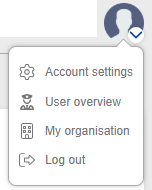
As an Aircraft Operator, you may select a verifier organisation in case you want them to work with you in the Sustainability Portal.
- Open the top-right menu
- Click on "My organisation"
- Click on "Select verifier organisation"
- Select the respective verifier organisation
- Click "Save"
Now the Verifier organisation will be able to perform the actions as described in the above section.
Verifier organisation missing
If an Aircraft Operator sees that a verifier organisation is missing when they navigate to the verifier overview.
Please follow the steps below
- Aircraft operator are to provide the following details to their Competent Authority
- Verifier organisation details
- Organisation name:
- Country:
- Verifier user details
- First name:
- Last name:
- Personal Work Email:
Note: For security, you cannot use shared inboxes like info@verifier.eu. Please use a personal work address such as firstname.lastname@verifier.eu.
- Verifier organisation details
- Competent Authority to review and validate correctness
- If the request is correct, the Competent Authority to inform EASA
- EASA to create a verifier organisation and invite the verifier user
- Verifier user will receive an invitation email from the Sustainability Portal